
FPS Meter
com.rdevzph.fpsmeter Zapstore _@zapstore.dev
 Lightweight real-time FPS overlay and game performance monitor
Republished from GitHub / F-Droid by the Zapstore main account.
A high-performance, lightweight FPS monitoring overlay for Android. Inspired by the Samsung Perf Z aesthetic, this application provides real-time performance telemetry for mobile gaming and development. Features: - Dual FPS Providers: - Choreographer: Measures display refresh and vsync pace with minimal overhead. - SurfaceFlinger: Privileged buffer queue monitoring using Shizuku to measure true in-game rendering frame rates. - Automatic Graphics API Detection: Detects whether games run on Vulkan or OpenGL ES (e.g. Genshin Impact, Wuthering Waves) and selects the appropriate frame metric strategy. - On-Screen Graphics API Badge: Displays [VK] or [GL] indicator on the floating counter. - Frame Time & Thermals: Real-time milliseconds (MS) frame time and device battery temperature. - Dynamic Color Coding: Adaptive FPS value colors based on performance thresholds. - Quick Settings Tile: 1-tap overlay toggle directly from the Android notification shade without switching apps. - Floating Assistive Bubble: Draggable on-screen bubble for instant show/hide during gameplay. - Auto Game Detection: Automatically activates the overlay when designated games launch via Accessibility Service. - Six Preset Positions: Quick-snap positioning with full touch-drag support. - Fully Open Source and privacy-focused: zero analytics, zero trackers, and zero network calls.
First release: Oct 12, 2026, 2 total releases.
Most recent release: Oct 16, 2026.
Appears in 0 app stacks.
0 sats / 0 zaps received in the past year.
Sats Received
Underlying data available via MCP: app_zaps, app_releases.
Zap Count
Underlying data available via MCP: app_zaps, app_releases.
Releases
- Oct 16, 2026 3.0# FPS Meter Android v3.0 ### What's New in v3.0 #### Added - **MSI Afterburner Style (RTSS) Overlay**: Added a new hardware overlay layout inspired by MSI Afterburner (RTSS), accessible via the Overlay Style setting. - **Hardware Telemetry Rows**: Added multi-row telemetry with distinct color tags for each hardware component: - Header: Detected processor or SoC model (such as MT6897). - GPU (Green): Real-time GPU temperature. - CPU (Sky Blue): CPU temperature and active clock frequency in MHz.
More…
- SOC (Electric Cyan): Dedicated system-on-chip temperature. - BAT (Amber Gold): Battery temperature and charge percentage. - RAM (Violet): Real-time available RAM in gigabytes and occupied percentage. - FPS (Salmon Coral): Frame rate, frame time in milliseconds, and detected graphics API. - **System Font Integration**: The overlay text now follows your device's active system font in bold weight instead of forcing a fixed font family. ### Feature Highlights | Overlay Style Setting | MSI Afterburner Style (RTSS) Overlay | | :---: | :---: | | 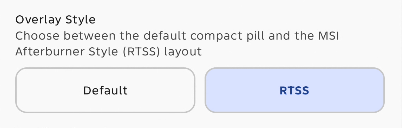 | 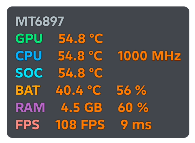 | For the complete release history, see [CHANGELOG.md](https://github.com/rdevz-ph/FPS-Meter-Android/blob/main/CHANGELOG.md). For known Android system behaviors and limitations, see [KNOWN_ISSUES_AND_LIMITATIONS.md](https://github.com/rdevz-ph/FPS-Meter-Android/blob/main/KNOWN_ISSUES_AND_LIMITATIONS.md). ### Features - Choice between Choreographer and SurfaceFlinger FPS measurement providers - Automatic Graphics API detection (Vulkan and OpenGL ES) - Two overlay styles: default compact pill and multi-row MSI Afterburner Style (RTSS) telemetry layout - Samsung-style pill-shaped overlay with cyan labels and white values - Real-time FPS, frame time (MS), RAM usage, and multi-metric temperature monitoring (CPU, GPU, SoC, and Battery) - Adaptive layout dynamically scaling across lines, with a single-line mode option for tablets and landscape gaming - Dynamic FPS color coding (green, yellow, orange, red) based on performance thresholds - In-memory per-game FPS session recording with dedicated History screen - Interactive floating assistive bubble with in-game quick control menu - Six preset positions (top/bottom left/center/right) with manual drag support - Light and dark mode themes - Multi-language support (English and Simplified Chinese) with in-app language switcher - Adjustable text size and overlay opacity - Optional Shizuku integration for one-tap permission grant, SurfaceFlinger game FPS, and hardware thermal monitoring - Quick Settings status bar tile and automated game detection via Accessibility Service ### Requirements - Android 8.0+ (API 26) - Overlay Permission (SYSTEM_ALERT_WINDOW) - Shizuku (optional, required for SurfaceFlinger real game FPS and SoC temperature monitoring) ### Installation & Setup Guides Download the APK from the assets below and enable the "Display over other apps" permission when prompted. > [!NOTE] > **Which APK should I download?** > - **Release APK (`FPS-Meter-*-release.apk`) [Recommended]:** Signed with the developer's official release key. Use this build if you want seamless in-place updates from GitHub in the future without needing to reinstall. > - **Debug APK (`FPS-Meter-*-debug.apk`):** Signed with the default Android/Google SDK debug key generated by automated CI builds. Useful for quick testing, but switching to a release build in the future will require uninstalling first due to Android's signature verification. If you encounter Play Protect installation blocks or Android 13+ restricted settings warnings when enabling features like Accessibility Service or Shizuku, follow the [Troubleshooting and Setup Guide](./tutorials/README.md). - Oct 12, 2026 2.8# FPS Meter Android v2.8 ### What's New in v2.8 - **Single-Line Overlay Mode**: Added a toggle in Overlay settings to display all performance, thermal, and RAM metrics on a single horizontal line, designed for tablets, wide screens, and landscape gaming. - **Telegram Community Link**: Added direct Telegram community link in the Settings screen. - **GPU Temperature Overlay Fix**: Verified and finalized the GPU temperature overlay fix for devices where the Android Thermal HAL reports combined Application Processor (AP) readings (such as the Samsung Galaxy Tab S9 Ultra, [#13](https://github.com/rdevz-ph/FPS-Meter-Android/issues/13)). - **Linux Sysfs Thermal Fallback**: Added fallback sensor detection and merging for Adreno, Mali, and Exynos GPU hardware when the Android Thermal HAL lacks separate GPU nodes. - **Third-Line RAM Overlay**: Added real-time available memory alongside occupied RAM percentage on a third overlay line, with an in-app toggle and responsive preview. - **Kernel Thermal Zones Dump**: Added an export tool in Device Diagnostics to dump raw Linux sysfs thermal zones and temperatures to a text file (.txt) with direct save, share, and copy options.
More…
For the complete release history, see [CHANGELOG.md](https://github.com/rdevz-ph/FPS-Meter-Android/blob/main/CHANGELOG.md). ### Features - Choice between Choreographer and SurfaceFlinger FPS measurement providers - Automatic Graphics API detection (Vulkan and OpenGL ES) - Samsung-style pill-shaped overlay with cyan labels and white values - Real-time FPS, frame time (MS), RAM usage, and multi-metric temperature monitoring (CPU, GPU, SoC, and Battery) - Adaptive layout dynamically scaling across lines, with a single-line mode option for tablets and landscape gaming - Dynamic FPS color coding (green, yellow, orange, red) based on performance thresholds - In-memory per-game FPS session recording with dedicated History screen - Interactive floating assistive bubble with in-game quick control menu - Six preset positions (top/bottom left/center/right) with manual drag support - Light and dark mode themes - Multi-language support (English and Simplified Chinese) with in-app language switcher - Adjustable text size and overlay opacity - Optional Shizuku integration for one-tap permission grant, SurfaceFlinger game FPS, and hardware thermal monitoring - Quick Settings status bar tile and automated game detection via Accessibility Service ### Requirements - Android 8.0+ (API 26) - Overlay Permission (SYSTEM_ALERT_WINDOW) - Shizuku (optional, required for SurfaceFlinger real game FPS and SoC temperature monitoring) ### Installation & Setup Guides Download the APK from the assets below and enable the "Display over other apps" permission when prompted. > [!NOTE] > **Which APK should I download?** > - **Release APK (`FPS-Meter-*-release.apk`) [Recommended]:** Signed with the developer's official release key. Use this build if you want seamless in-place updates from GitHub in the future without needing to reinstall. > - **Debug APK (`FPS-Meter-*-debug.apk`):** Signed with the default Android/Google SDK debug key generated by automated CI builds. Useful for quick testing, but switching to a release build in the future will require uninstalling first due to Android's signature verification. If you encounter Play Protect installation blocks or Android 13+ restricted settings warnings when enabling features like Accessibility Service or Shizuku, follow the [Troubleshooting and Setup Guide](./tutorials/README.md).